 Live Manual
UTM Manager Cloud · customer manual
From campaign link to a clear customer journey
Install one tracking snippet, build consistent UTM links and QR codes, then follow campaigns, visits and sessions from one customer portal.
Choose your task
What do you want to do?
Connect a website
Find the correct snippet, add it to your site and verify that tracking is active.
SetupBuild campaign links
Create a naming structure, generate UTM links and add static or dynamic QR codes.
CampaignsUnderstand the traffic
Compare campaign performance and inspect how individual visits continue through the site.
InsightsThe main workflow
How the product fits together
Your starting point
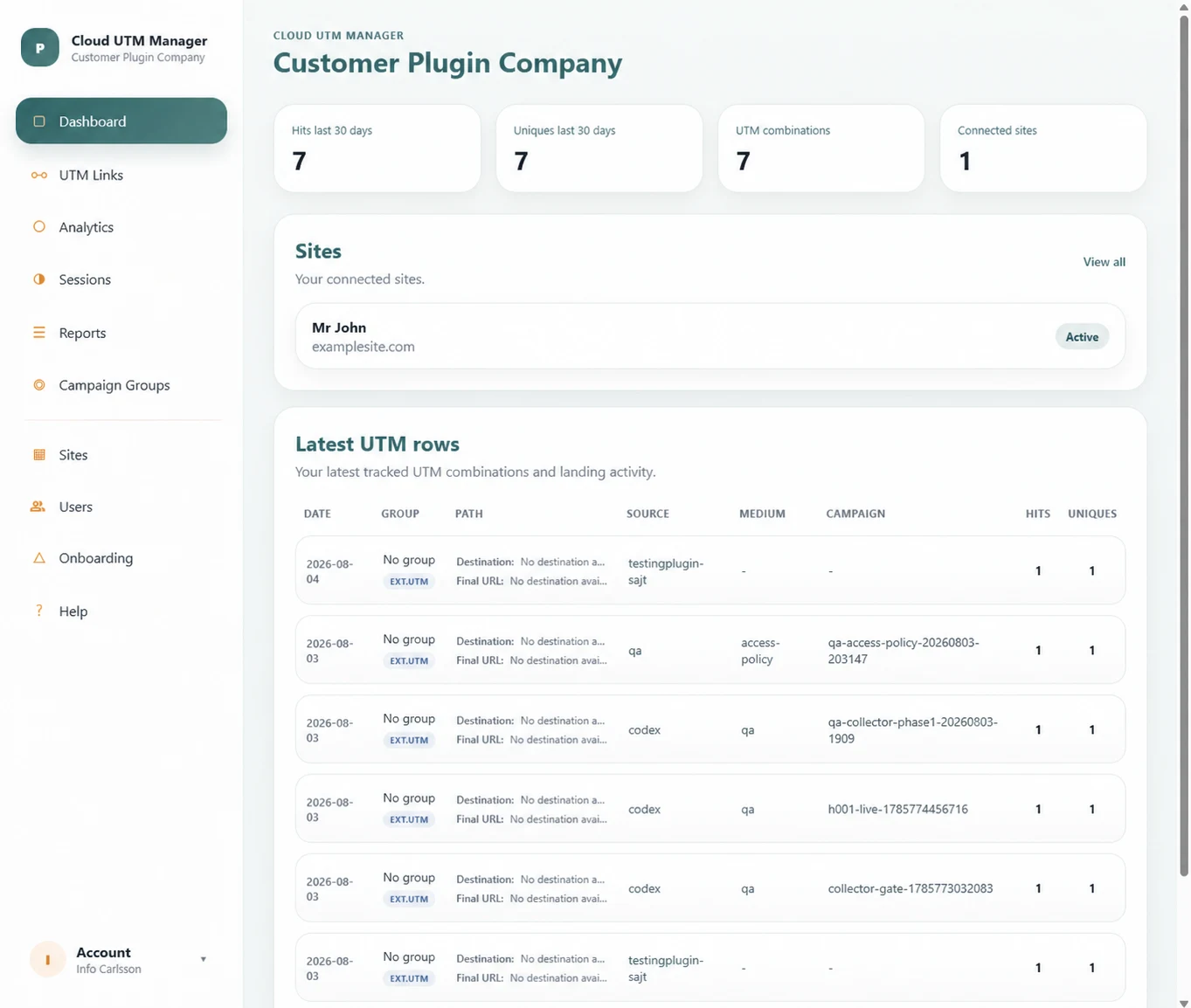
Dashboard at a glance
The dashboard shows traffic from the last 30 days, connected sites and the most recent UTM combinations. Use it as a quick health check before opening a detailed view.
Manual contents
All sections
Getting started
Sites, site keys, snippet installation and tracking verification.
UTM links and QR codes
Parameters, naming, previews, static QR and dynamic QR.
Analytics and Sessions
Filters, comparisons, campaign KPIs and visitor journeys.
Campaigns and reports
Campaign groups, saved views and PDF exports.
Account and subscription
Users, profile, plan limits, purchase history and settings.
Help and support
Best practices, FAQ, tickets and practical troubleshooting.